Google Analytics 4 vs. The Cookieless World

SHARE:

Cookies or Cookieless. There’s been a lot of buzz among marketers about the timing of the Google Analytics 4 roll out. A few weeks back, Google made the announcement they were prolonging the timeline for their privacy sandbox push as publishers, browsers, advertisers and other 3rd parties were clamoring to roll out the approved version of tracking in the cookieless world.  

This announcement doesn’t apply to Google Analytics and their rollout of GA4. Google knows that while 3rd parties begin to develop cookieless technologies, its analytics platform must be the foundation for measurement.  

Their push for Google Analytics 4 adoption is obvious. With nearly half of all the websites across the web running analytics, Google is pushing GA4 right inside their account creation. Here is a screenshot of the set-up process which highlights Google’s emphasis on GA4. (You’ll see “Google Analytics 4” highlighted.)
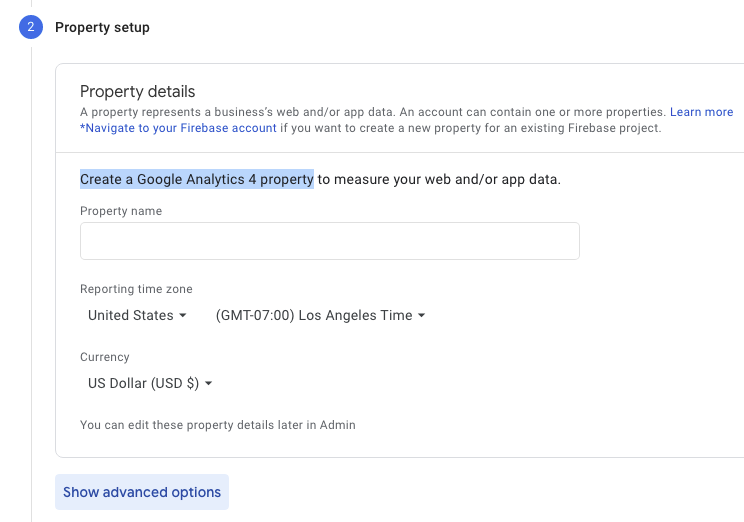
Screenshot of Google Analytics 4 implementation screen

If you’re a current Google Analytics user, it’s important to upgrade to the latest version. GCommerce has been running both GA3/GUA alongside GA4 to understand the difference in data and measurement. For the month of June, we saw significant decreases in revenue within our GA3 profiles. 
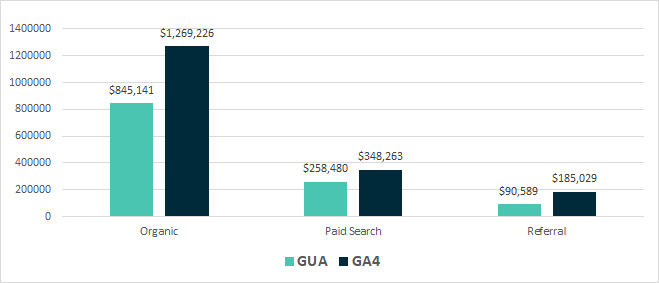
Table showing revenue data coming from Google Analytics

Our tests have shown that Google UA underreports Organic by 33%, Paid Search by 26%, and Referral by as much as 51% when compared to the attribution of GA4. This could be for a couple reasons:

  • Legacy cookie tracking (GA3/GUA) is starting to deprecate as the cookieless world grows closer, creating data gaps for major revenue channels
  • Advanced attribution models based on the new “engaged users” provides more transparency through the booking funnel

You want to have the latest analytics technology available for measurement, and that means upgrading to Google Analytics 4. GA4 will work with legacy cookie technologies along with new best practices as we move towards the cookieless world. There’s no reason to wait. Contact the experts at GCommerce today.

The EU’s Ruling on Data Transfers- Updates to Google Ads Terms

SHARE:

Why Did Google Ads Send Me An Email Re: Updates about GDPR Compliance?

In July 2020, the EU’s highest court ruled against the validity of the Data Privacy Shield for protecting EU citizen data when it is transferred out of the EU to other countries including the US. This caused many businesses, including Google and other ad tech companies, to have to revise their platforms’ data processing terms.

What Did the EU Rule on Data Transfers to the US in July 2020?

In July 2020 the Court of Justice of the European Union, the highest court in the EU, ruled that the current Privacy Shield that allowed transfers of online advertising and measurement personal data out of the EU to the US was invalid. This was based on the court finding that EU citizen data could be interfered with by the US government based on the country’s current surveillance laws. 

TechCrunch.com’s Natasha Lomas explains that, The CJEU’s finding is that “the requirements of US national security, public interest and law enforcement have primacy, thus condoning interference with the fundamental rights of persons whose data are transferred to that third country”, and that mechanisms in the EU-US Privacy Shield ostensibly intended to mitigate this interference (such as an ombudsperson role to handle EU citizens’ complaints) are not up the required legal standard of ‘essential equivalence’ with EU law.

The Court of Justice of the European Union did keep Standard Contractual Clauses (SCCs) in place as a valid and legal way for businesses including banks, Facebook, and Google to transfer online advertising and measurement personal data out of the EU and into the US. This effectively provides these companies with a way to maintain data transfers outside of the EU and into the US (and other countries) for the time being.

How Does The EU Ruling on Data Transfers Impact My Google Ads Account?

Since SCC’s are still considered an allowed method of transferring data from the EU to servers in the US, Google is moving to use them for all transfers of online advertising and measurement personal data out of the EU, Switzerland and the UK in order to stay in compliance with the ruling.

Google is also updating its existing Google Ads Data Processing Terms, Google Ads Controller-Controller Data Protection Terms, and Google Measurement Controller-Controller Data Protection Terms to add the relevant SCCs as adopted by the European Commission. These updated contract terms for using Google Ads will apply starting on August 12, 2020.

How Can I Make Sure My Google Ads Account Is Still In Compliance with GDPR?

First off, we are not legal experts and you should be consulting your lawyer regarding how to keep your business in compliance with GDPR and other consumer data privacy protection laws. 

  1. Google’s updated contract terms that add the relevant SCCs ensure your agreement with their ad platform keeps the account in compliance with the updated ruling. 
  2. Make sure you have a cookie preference solution in place (such as OneTrust) on your site. Make sure settings are specific for traffic from visitors from the EU countries, allowing them to control how their personal data is used across the site and ad platforms. 
  3. We also recommend that you have detailed information regarding your business’ privacy policies that can be found on the privacy policy page on your website. 

The court’s standing on SCC’s and how EU citizens’ data is transferred out of the EU could come under further scrutiny, which could further complicate things for banks, ad tech companies, and other businesses. 

Have further questions about the recent EU ruling on data transfers and how it affects your Google Ads account? Please make sure to consult your lawyer and be sure to reach out to GCommerce to help you implement cookie compliance tools on your website.

We Increased ROAS 123% For Our Hotel Clients’ Google Ads, Here’s How

SHARE:

At the end of 2018, Google turned the SEM industry on its head by once again changing the definition of its exact match keyword targeting. The definitions and performance by match type have historically dictated campaign structure for many across the SEM industry, GCommerce included. Google’s 3rd and most recent change to exact match forced paid search marketers to reexamine their account structures and best practices. When we did, we found an incredible opportunity to reinvent our paid search account structure to drive substantial improvements in performance for our clients. Read below to find out how we did it.

A Quick History of Google’s Keyword Match Type Definitions

To set the stage, let’s take a quick look back over the evolution of Google’s exact match keyword targeting definitions.

Pre-2014: Exact Match means the searcher has to type your keyword in exactly as you have it written in order for the search to trigger your ad.

Search = luxury hotel in park city Keyword = luxury hotel in park city

2014: Google updates its exact match keyword definition to allow your ad to trigger for the exact spelling of your keyword PLUS plurals and misspellings 

Search = luxury hotels in park city Keyword  = luxury hotel in park city

2017: Google updates its exact match keyword definition again to trigger your ad for the exact phrase or misspellings and plurals OR different word order and function words

Here are two great tables from Search Engine Land’s article to help explain:

Function words:

Word Order:

What Do These Changes Mean For My Hotel’s Google Ads Account Structure? 

But, what does this all mean for paid search optimization and account structure? Separating campaigns by match type used to mean we had more control of where to funnel our ad dollars based on what keywords and match types were performing the best. We found that with Google’s latest updates to match type definitions, if we had the same keyword with a different match type located in different ad groups within the account, they would now compete with each other. The theory became, if we restructured our accounts to keep all keywords (of all match types) within the same ad group, we should see lower CPCs which in turn would drive more traffic, more conversions, and higher ROAS. We tested the theory across a sampling of our hotel client Google Ads accounts.

Results of Our Hotels’ Google Ads Restructure Tests Based On Match Types

Let’s dive into the test results. On average this is what resulted from the changes we made in account structure based on the new keyword match type definitions:

  • CPCs declined by 30%
  • ROAS increased by 123%

This meant our paid search campaigns were able to drive 80% more revenue on average for our hotel clients across the sample set of test accounts. After reviewing the results, we rolled out the change across all of our hotel Google Ads accounts and continued to see outstanding results across the board.

It’s important to always keep an eye out for announcements from Google Ads and make sure you’re testing, restructuring, and updating your accounts based on what provides the best results. If your agency isn’t constantly evolving your campaigns based on changes within the platform and your industry then you risk wasting budget and sacrificing performance. Have questions about how we can help your hotel launch or test this new account structure? Please reach out to one of our hotel digital marketing experts today.

How We Use Google Ads Max Click Bid Strategy to Improve Brand Awareness

SHARE:

At GCommerce, we are always testing new features across the platforms we use for our clients.  Recently Google Ads introduced automated bid strategies for Paid Search that uses machine learning to adjust bids based on the specific objective you choose. For clients that either don’t have conversion tracking or not enough conversion data for the platform’s conversion-based bid strategy algorithm, we decided to test Google Ads’ Max Click Bid Strategy.

The first client we transitioned from manually managed bids to a max click automated bid strategy was chosen because their main goal was to drive awareness and increase website sessions. I decided they would be a perfect fit for a bid strategy set with an objective to drive max clicks within the set budget.

Here are our results comparing YOY data:

Paid Search KPIs YOY:

  • Impression share increased by 9%
  • Clicks increased by 25%
  • CTR increased by 15%
  • CPC’s decreased by 11%

Overall website performance increased. More notably, their paid search campaigns had significant improvements, including a 12% decrease in bounce rate and a 22% increase in sessions.

Overall, the Google Ads Max Click bid strategy structure resulted in positive improvements in performance and has helped the client improve on their awareness goal.

Another client's paid search account that I placed on the same bid strategy saw similar improvements. Their main goal was also to increase awareness.

Paid search results YOY:

  • Impressions share increased by 4%
  • Clicks increased by 119%
  • CTRs increased by 97%
  • CPC’s decreased by 55%

Google Analytics showed the client’s sessions and average duration increased and their bounce rates decreased.

Once again, we saw positive increases in the accounts that support our properties' awareness goals by using Google Ads Max Click bid strategies.

If you are not using paid search bid strategies, you’re not only being less efficient with your budget, but you are also wasting time manually adjusting bids when the time could be better spent focused on high-level strategizing, audience targeting, keyword expansion, refining your ad copy, and more.

GCommerce recommends selecting a bid strategy for your campaigns that matches the business objective. Conversion based bid strategies are preferred but if you don’t have conversion tracking or you don’t have enough conversions, start with max clicks bids strategies.

Why Your Hotel Needs Remarketing Lists for Search Ads

SHARE:

The continued climb in cost per acquisition means your hotel’s digital marketing budget needs to be working harder and more efficiently than ever before. Your digital marketing agency should be obsessed with finding the most cost effective methods to optimize their efforts (and your budget) across all media channels. One of the more exciting and fruitful targeting options to be released by Google this decade comes in the form of retargeting for search campaigns. Officially called remarketing lists for search ads (RLSA for short), creating a remarketing audience list for your hotel’s paid search campaigns is now essential for optimization because it allows you to reengage with previous visitors to your website, which has proven to improve conversion rates and overall return on ad spend for your budget.

First, let’s start with the basics:

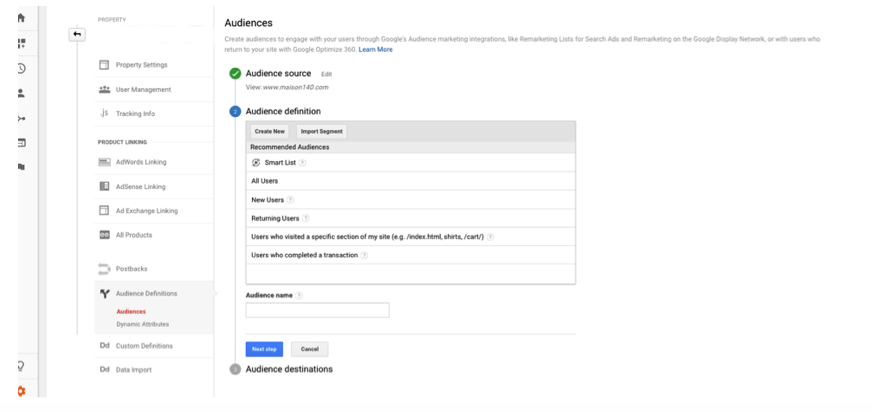
How to Set up Custom Audiences for Your Remarketing Lists for Search Ads

We recommend building audience lists in Google Analytics instead of Google Adwords since it gives you a far greater selection of criteria to choose from when building your audience segments. Once you are logged in, just follow the steps below:

  • Go to the Admin tab and navigate to the property for whom you want to create the audience
  • Click Audience Definitions > Audiences > + New Audience
  • Define Your Audience
    • You can choose from a number of different audience definitions:
      • Smart List
      • All Users
      • New Users
      • Returning Users
      • Users Who have visited a specific section of my site/app
      • Users who completed a transaction
SEM remarketing list

You can create unique audience lists based on user behavior on your site and then use those lists for future remarketing campaigns. Before you get started, there are a few things you should know about remarketing audience lists:

    • Audience List Definition: a collection of people who have visited your site
    • Audience lists are used for remarketing
    • The membership of an audience list has a life span of up to 540 days
    • The List needs to have at least 1000 people to target in paid search campaigns

What Audience Segments Can You Create?

The type of audience list you should set up will depend on your client’s objectives.  The most common audience list is “all users” and if you’re new to retargeting or if you have low website visitors, this is where you should start. This is comprised of any visitor to your website.  The real magic and excitement in RLSA audiences comes when you can refine your audience down to more specific lists. Ideas include:

    • All website visitors that have converted in the past X number of days (exclude them from your campaigns – if they just booked a hotel room, you probably don’t want to spend money continuing to market to them)
    • Website visitors to a specific page on your site (such as a list of only visitors who have navigated to a page about weddings)
    • Visitors who have come to the site a specific number of sessions (pick the session number it usually takes to achieve a booking)
    • Website visitors that match a specific demographic – such as gender or age specific
    • Visitors that are on a specific device – mobile, desktop, tablet
    • Visitors that enter the site from a specific source – for example only visitors that came from Facebook or your latest email campaign

To really target your most qualified users, you can segment this list down even further into specific users over a period of time that has not converted.  Typically the more recently a user has visited your site, the more likely they are to convert.

    • All Users Past 7 Days
    • All Users Past 15 Days
    • Cart Visitors
    • Visitors of a certain page on your website

These lists will also allow you to set bid adjustments or remarket with a specific offer or ad set. For example, if a potential hotel guest made it all the way through the booking process but abandoned their shopping cart just before checking out, you could use your remarketing audience list to serve them a new add with an enticing offer in order to encourage them to book their reservation.

What’s the Best Way To Structure Your Campaigns & Assign Audiences?

How you choose to structure your campaign and assign your audience lists really comes down to your personal preference and how you want to manage your targeting settings.  Below are a couple examples of how to do this.

    • If you have a smaller budget to work with and can’t come up with extra funds for a dedicated campaign just for remarketing, you can attach audiences to campaigns as bid only. This will show your ads to members of your remarketing list in addition to the users who match whatever other targeting you currently have set up on the campaign
    • If budget isn’t a hindering factor and you get a good amount of traffic to your website, then you can create remarketing campaigns for all of your custom remarketing audiences you built in Google Analytics and set bid adjustments based on priority and performance

In the hotel marketing industry, we have seen great results when utilizing remarketing lists for search ads. After reviewing data from multiple clients, we have found that they helped decrease average CPC ‘s by 16% while increasing average CTR’s by 62% and ROAS and Conversion Rates by over 100%. To learn more about our internal findings of the benefits of audience lists read our blog post about it.

Need help getting started with remarketing lists for search ads? Reach out to GCommerce today.

How Much Should I Spend on Paid Search for my Hotel?

SHARE:

We get this question all the time from prospective clients and new clients and it’s also something we revisit at least once (or more) every year for current clients. The truth is, there’s a lot more to it than picking a number based on the hotel’s location. It’s a complex answer that can only be determined by deep discovery and understanding of the hotel and its goals, the market the property is located within and historical data from the hotel. At GCommerce, every client’s budget recommendations are customized based on the hotel’s specific goals, historical performance and competitive landscape coupled with data from tools provided by Google, Bing and Doubleclick Ad Services.

7 Key Steps to Determining Paid Search Budget Recommendations for your Hotel

  1. Hotel Discovery & Determining Competitive Advantages - this guides our keyword research which helps us determine the estimated cost per click for qualified keywords. We seek answers to questions such as, What adjectives describe the hotel? What are the nearby attractions that drive visitors to the market? What are the top business drivers for the hotel? What are the hotel’s top competitors? What special amenities, services or events does the hotel support? Then we utilize keyword planner tools from Google and Bing to determine keyword CPC and traffic estimates.
  1. Establish business goals - we work closely with the client to determine their top priorities. Do they have a revenue goal they need to achieve? Does the client want to focus on driving more wedding or meeting business? Are they competing with OTAs to capture reservations? What are some of their biggest challenges and how might paid search help them overcome those hurdles?
  1. Complete Competitive Research - paid search pay per click costs are based on a bidding model. Competitive research factors in how many other advertisers are bidding on the same keywords, whether or not other advertisers are bidding on your brand name and also provides an understanding of highly valuable keywords we should be including in our campaigns.
  1. Analyze Historical Performance - the best way to estimate how specific budget recommendations will impact your bottom line or other business goals is to understand historical performance. GCommerce deep dives into website data, looking back multiple years, to gain insight into traffic, production, conversions, seasonality and other performance trends by month.
  2. Market Research - where is the hotel located? does the market experience any seasonality? We gather information from the client directly and utilize Google Trends to follow keyword popularity trends over time. It is important to allocate budgets as it correlates to business goals and seasonality in the market.
  1. Future Predictions - with a solid understanding of the hotel’s market and their previous performance, we can predict with a degree of confidence how much a specific budget might impact a hotel’s paid search marketing efforts. If they previously spent $Y and saw a return of $X, what kind of results would we expect if we increased or decreased their budget? Using this predictive modeling, we can find the optimal budget to ensure each has a healthy budget that reflects a positive Return On Ad Spend within their stated goals.
  2. Finalization of Target Keywords and Presentation to Client - last, we will prioritize these keywords based on relative competition, traffic, and the hotel’s goals. We will work closely with the client to ensure that all keywords are relevant to their business and end goals. Organizing these keywords into the most relevant Adgroups based on what is most likely to convert provides us with the best opportunity for success in starting with a new budget.


At GCommerce, we believe in a customized approach for every client. This is true for all aspects of the overall marketing strategy and is how we approach each client’s budget recommendations. We utilize the vast amount of historical data and experience we have from working with clients in markets all over the country and combine that with a custom analysis to provide the best hotel paid search budget recommendations possible.

If you’re interested in learning what you should spend on paid search for your hotel, please reach out to your Account Executive or Account Manager today. Not a GCommerce client? Not a problem. Contact us and we can help you get started with strategic paid search marketing solutions today!

Keep Reading