An Overview of Google’s Helpful Content Update

SHARE:

Google's big push with it’s latest algorithm update, named the helpful content update, is taking aim at pages that are solely produced for search engines and not users.  A lot of this targets pages with content auto-generated by AI writing apps or not providing original content/value on whatever the page topic is about. GCommerce’s SEO and content recommendation focus has always been with an emphasis on creation for people but making sure to use SEO best practices as outlined by Google. I think this article by Google really outlines how any website should think about Google’s helpful content update in an easy-to-understand format. 

Our suggestions remain the same as they have been. That pages should have rich, original content, and then the content provided should also integrate SEO optimization best practices based on Google's guidelines to position the page in the best way to achieve success in the SERPs (and avoid crazy performance issues when algorithm changes occur). We never attempt "black hat" tactics or tactics geared solely at search engines without first considering the value to someone coming to the site looking for the type of product or search topic we are optimizing that page for. If you have used auto-generated/AI content or simply created pages with low-value content for the sake of search engine ranking and it doesn't provide value to someone researching that topic, then we would recommend updating it or removing it from your site.

Want to understand if your site is impacted by Google’s helpful content update as it rolls out over the next couple of weeks? Since it is an update that adds the signal as one of the many signals Google uses in the algorithm. The best place to monitor overall performance continues to be within Google Search Console performance reports. You can also add another layer of reporting by monitoring your positions through a platform such as SEMRush and keeping an eye on your Analytics organic traffic. 

This update by Google was maining focused on eCommerce product sites and entertainment-related sites as you can tell by some of the language used in it’s Google update/release article, but I think it's a great reminder for all businesses across any industry that it's important to optimize their site experience and content for users while also making sure to follow SEO best practices for optimization. We’ve always viewed the two (optimizing for people and great SEO best practices) to have a ton of overlap if done correctly. 

Have questions or think your site may have been impacted? Please reach out to our search experts with any questions.

Google Hotel Ads, The OTA Disrupter Your Hotel Needs Now

SHARE:

Back in July, we shed light on how direct bookings can be more profitable than OTA bookings for hotels, even when you factor in media costs. The development and execution of a superior direct booking strategy for our hotel clients has always been GCommerce’s mission. Why? Because we were born out of a hotel management company which means we’ve always tried to focus on what’s best for the hotel. It’s in our DNA.

Now, what if I told you that there was a risk free direct booking channel that can drive an average of 8% of total web bookings at an average 5% conversion rate? One that only incurs a cost when it produces a stay that actually occurs, and is less than a commission payment to an OTA. Would you be interested? Is there anything that would hold you back from giving it a try?

Through the pandemic, Metasearch has evolved to not only be a top producing revenue channel to drive direct bookings, it has shape-shifted to provide hotels with a risk free billing option during a period of uncertainty in the travel industry that saw record cancellation rates. It is a powerful addition to the arsenal in the fight against hotel booking contributions coming from OTAs. Why is that important?

  1. Because direct bookings are more profitable to the hotel
  2. It helps hotels prepare for a cookieless world future by owning the guest data through direct bookings for remarketing purposes, which helps long term profitability.

While some hotels have been slower to adopt this channel into their direct booking strategy, there really is no better time to try it. The OTA’s have been owning this ad space since its inception because they know it’s power and profitability. OTAs like Expedia have even been fighting Google with government lobbyists because they feared the impact this evolution of Google’s travel vertical would have on their business model. Google has changed their travel planner and hotel search over the years with the specific purpose of funneling users to the Google travel planner and hotel search tools.

They have pushed the visibility of Google Hotel Ads into the knowledge panel, into the SERP and as the ultimate call to action in Google hotel search. 

And they have handed hotels the keys to driving more direct bookings and relying less on the OTAs. How? Because Google has become the OTA. Consumers no longer have to navigate to Expedia or Booking.com to comparison shop. They can do it directly within Google.

Now ask yourself again. What is stopping me from distributing my hotel’s inventory and rates to Google Hotel Ads and other metasearch channels? Here’s why your hotel should be advertising with direct inventory and rates on Google Hotel Ads and metasearch:

  1. You can advertise risk free with a pay-per-stay contract type, paying only when a stay is consumed
  2. Google has invested time and resources to increase visibility to this channel across its entire ecosystem. More visibility = more awareness, traffic and bookings
  3. The OTAs are already there, eating up your hotel’s bookings and sending you the robust commission bill
  4. Google Hotel Ads is owning the hotel comparison shopping game and giving hotels the chance to drive the bookings directly through their own website
  5. It can increase your hotel’s profitability by helping to drive more direct bookings - an average of 8% of total web bookings and an average conversion rate of 5%
  6. More direct bookings helps you own the guest data and better prepare your business for a world without 3rd party cookie tracking

Can you still think of a good reason not to advertise your hotel’s direct rates and inventory feed to Google Hotel Ads and other metasearch channels? Probably not. Now that you’re ready to focus on this channel, how can you make sure it’s successful?

  1. Make sure you map the best available rate found on your booking engine landing page to Google Hotel Ads and other metasearch channels including TripAdvisor, Bing Hotel Ads, Trivago and Kayak. Not only is the price accuracy of your feed to what’s on your landing page important for ranking, it ensures you are sending the lowest rate possible to help with parity.
  2. Ensure your rates are the lowest shown on metasearch channels (rate parity) - OTAs are constantly trying to undercut to ensure they are the lowest displayed. Why? Because the lowest rate wins the booking. Make sure you use a rate parity monitoring tool to assist you with your revenue management. We recommend The Hotel Network’s metasearch disparity tool for the most accurate insights.
  3. Test the inclusion of different marketing call-outs within Google Hotel Ads such as any direct booking incentives, competitive advantages and flexible cancellation policies
  4. Monitor and adjust bids towards the best performing segments including device type, days to arrival, check-in date and more. Google has also just announced the addition of bid adjustments by check-in date to help with exposure towards specific time periods. 
  5. Focus on Google Hotel Ads but also look at testing different metasearch channels. While Google Hotel Ads has the lion’s share of metasearch advertising’s click and booking volume, try testing other channels like TripAdvisor, Bing Hotel Ads, Kayak and Trivago for additional exposure and booking opportunities.

Now, how can you get started running metasearch ads, including Google Hotel Ads, for your hotel? First, you’ll need to connect your rates and inventory feed through a connectivity partner. GCommerce offers a full service hotel metasearch advertising solution that can facilitate this for you and handle all management of metasearch campaigns. Have more questions or are looking for additional information? Please reach out to one of the hotel marketing experts at GCommerce for more information.

Expand Your Restaurant’s Reach with Google My Business Posts | GCommerce

SHARE:

What Are Google My Business Posts?

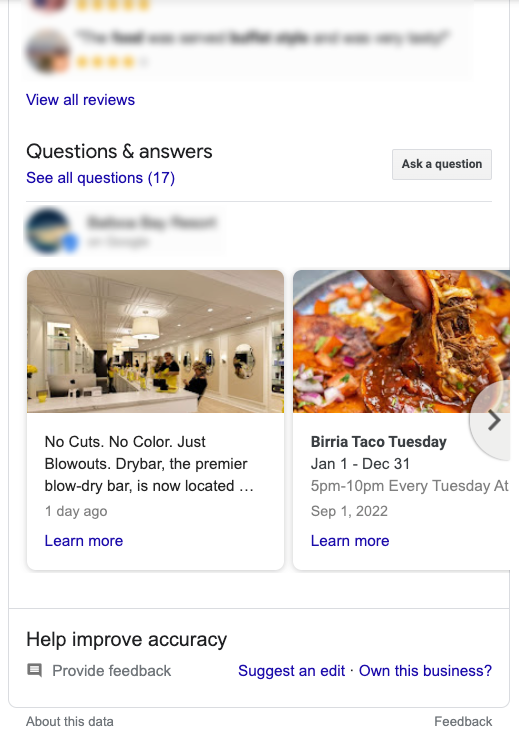
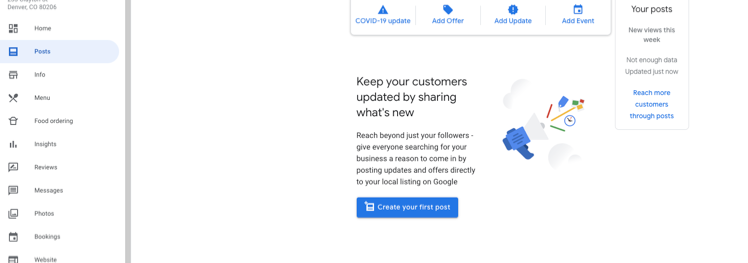
Posts on Google My Business is an off-site local search engine optimization feature that is free and allows you to highlight your business and connect with existing & potential customers. Think of them like a social media post but located on your Google My Business page and visible within your business’ knowledge panel in the search results. Google My Business posts can be a very powerful tactic to improve your business’ local search optimization and reach but it is only available for specific industry types. Sorry hotels, this is one feature Google doesn’t provide to your type of business. (Probably because they are too busy monetizing this space with Google Hotel Ads). 

How Can Restaurants Utilize Google My Business Posts?

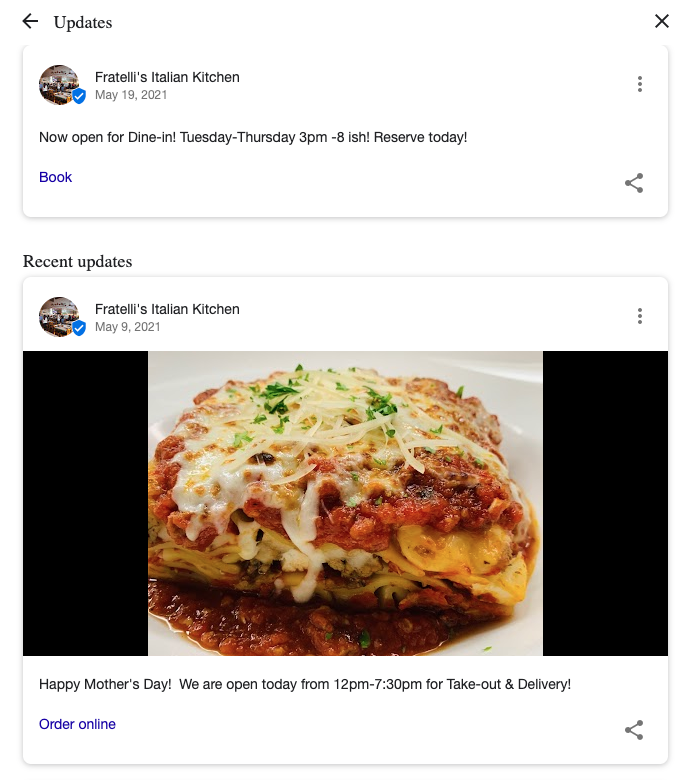
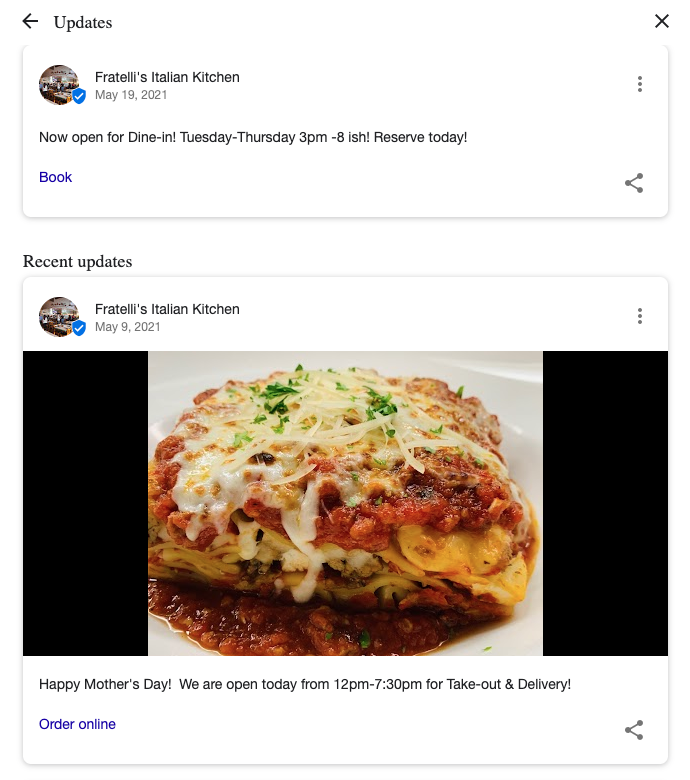
Restaurants can promote their specials and any updates to their menus, COVID- 19 policies, and more. When created, Google can display up to eight of your business’ most recent posts. Posts, for the most part, are visible for seven days and then are removed. This does vary depending on the type of Google My Business post used.

What Are The Different Types Of Google My Business Posts? 

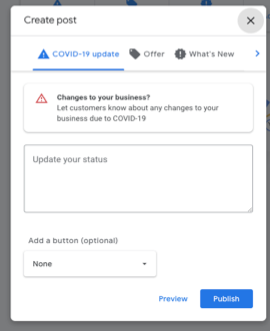
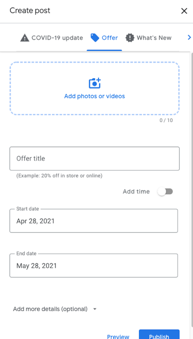
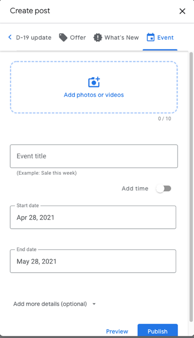
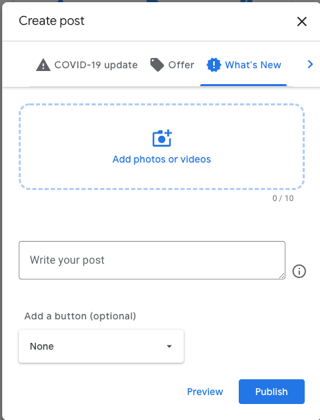
There are Four types of Google My Business Posts that can be used:

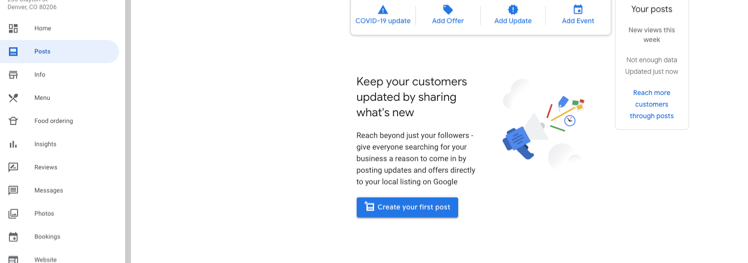
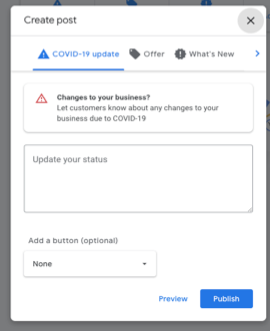
COVID-19 Update – The newest type of Google My Business post due to the pandemic allows you to set up a post that lets customers know about any changes made due to COVID-19. Such as a change in hours, updates to safety and hygiene, whether you provide curbside pick-up or takeaway are a few examples.

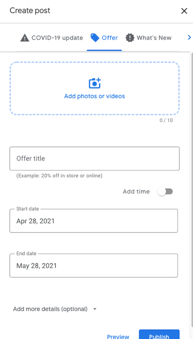
Special Offers – Best used to announce limited-time promotions. With this type of Google My Business post, you can load a video or photo to support & draw attention to the time-sensitive event. You can also designate whether redemption can be done online or with a coupon code for in-store visits.  This post also requires a timeframe to be provided.

Events – An easy & free way to promote an event. Events require a time frame like offers, a title, and the event's time. Google will default to 24 hours if a specific time is not included. This post type can also include photos, videos, descriptions, and an action button.

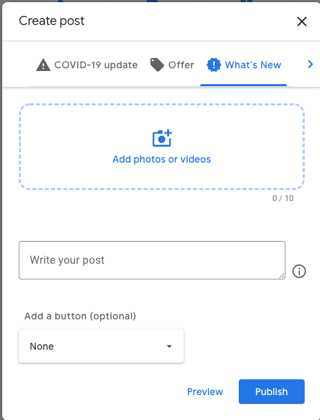
What’s New – This type of Google My Business post allows a business to provide general information with photos, videos, descriptions, and an action button. A restaurant could use this to promote new menu items.

Products – This type of Google My Business post allows you to feature multiple products you have available at your business. However, a Product tab will need to be set up before using products.  These posts are also not shareable.

What Are Best Practices For Google My Business Posts?

When using Google My Business posts, keep these best practices in mind:

  • Use high-quality images & videos. Image Size: min: 400 wide x 300 pixels tall, 10kb | max: 10,000 x10,000 pixels, 25 MB. Videos: File Size Max 1000MB.  
  • Keep posts in the 150–300-character range. Generally, the first 7-8 words will show. Hashtags are unnecessary in Posts. 
  • Include a CTA & Landing page depending on the post type. 
  • Use UTM parameters so you can view the traffic generated from the posts. 
  • Keep it strictly business. 
  • Google can and will ding business for misspellings & poor-quality content so use preview before posting. 
  • Obey Google Posting Rules. Stay away from offensive content and anything that violates a person’s or location’s privacy.

Don’t Disregard This Free Google My Business Service

It’s simple and doesn’t take a long time to create and it’s free. So, begin posting, and continue to expand your customer base. Unsure of what your first post should be? How about your specials, grand opening, new menu item or just a friendly Welcome? Need more suggestions or do you have questions, reach out to us, GCommerce Solutions, we are always happy to assist!

Expand Your Restaurant’s Reach with Google My Business Posts

SHARE:

What Are Google My Business Posts?

Posts on Google My Business is an off-site local search engine optimization feature that is free and allows you to highlight your business and connect with existing & potential customers. Think of them like a social media post but located on your Google My Business page and visible within your business’ knowledge panel in the search results. Google My Business posts can be a very powerful tactic to improve your business’ local search optimization and reach but it is only available for specific industry types. Sorry hotels, this is one feature Google doesn’t provide to your type of business. (Probably because they are too busy monetizing this space with Google Hotel Ads). 

How Can Restaurants Utilize Google My Business Posts?

Restaurants can promote their specials and any updates to their menus, COVID- 19 policies, and more. When created, Google can display up to eight of your business’ most recent posts. Posts, for the most part, are visible for seven days and then are removed. This does vary depending on the type of Google My Business post used.

What Are The Different Types Of Google My Business Posts? 

There are Four types of Google My Business Posts that can be used:

COVID-19 Update – The newest type of Google My Business post due to the pandemic allows you to set up a post that lets customers know about any changes made due to COVID-19. Such as a change in hours, updates to safety and hygiene, whether you provide curbside pick-up or takeaway are a few examples.

Special Offers – Best used to announce limited-time promotions. With this type of Google My Business post, you can load a video or photo to support & draw attention to the time-sensitive event. You can also designate whether redemption can be done online or with a coupon code for in-store visits.  This post also requires a timeframe to be provided.

Events – An easy & free way to promote an event. Events require a time frame like offers, a title, and the event's time. Google will default to 24 hours if a specific time is not included. This post type can also include photos, videos, descriptions, and an action button.

What’s New – This type of Google My Business post allows a business to provide general information with photos, videos, descriptions, and an action button. A restaurant could use this to promote new menu items.

Products – This type of Google My Business post allows you to feature multiple products you have available at your business. However, a Product tab will need to be set up before using products.  These posts are also not shareable.

What Are Best Practices For Google My Business Posts?

When using Google My Business posts, keep these best practices in mind:

  • Use high-quality images & videos. Image Size: min: 400 wide x 300 pixels tall, 10kb | max: 10,000 x10,000 pixels, 25 MB. Videos: File Size Max 1000MB.  
  • Keep posts in the 150–300-character range. Generally, the first 7-8 words will show. Hashtags are unnecessary in Posts. 
  • Include a CTA & Landing page depending on the post type. 
  • Use UTM parameters so you can view the traffic generated from the posts. 
  • Keep it strictly business. 
  • Google can and will ding business for misspellings & poor-quality content so use preview before posting. 
  • Obey Google Posting Rules. Stay away from offensive content and anything that violates a person’s or location’s privacy.

Don’t Disregard This Free Google My Business Service

It’s simple and doesn’t take a long time to create and it’s free. So, begin posting, and continue to expand your customer base. Unsure of what your first post should be? How about your specials, grand opening, new menu item or just a friendly Welcome? Need more suggestions or do you have questions, reach out to us, GCommerces Solutions, we are always happy to assist!

Flywheel News | Your Top 7 Hotel Digital Marketing Updates From May 2020

SHARE:

1. Google Announces New Signal in Ranking Factors

Google has announced that it will be introducing a new ranking signal that focuses on evaluating user experience from a web page. Existing signals that were aimed at assessing user experience such as HTTPS, mobile-friendliness, and avoiding interstitials will be combined with what is called Core Web Vitals. These Core Web Vitals include:

Google has defined these as the Core Web Vitals:

  • Largest Contentful Paint: The time it takes for a page’s main content to load. An ideal LCP measurement is 2.5 seconds or faster.
  • First Input Delay: The time it takes for a page to become interactive. An ideal measurement is less than 100 seconds.
  • Cumulative Layout Shift: The amount of unexpected layout shift of visual page content. An ideal measurement is less than 0.1.

These won’t impact ranking until next year at the earliest but you should start taking a look at how your site performs by auditing these in Search Console or Chrome’s developer tools. Webpages that are able to positively impact these metrics will have a leg up on the competition. 

2. Google Ads SMB Credits Start Rolling Out to Accounts

Good news for SMBs! Google ad credits have started showing up within accounts. The first is going to SMBs in New Zealand but will expand to other countries over the next few weeks. Keep an eye out for these additional marketing funds. We’re actively monitoring our client accounts for these ad credits.

3. Facebook Launches Shops Feature

Facebook has officially entered the eCommerce world with the introduction of its new feature, Facebook Shops. Facebook’s new feature looks to directly compete with Amazon and Google Shopping. Positioned at helping SMBs during this crisis, pages are able to add products to their Facebook Shop and people are able to interact, shop, and purchase either directly on Facebook or by visiting the business’ website. Shops are free to set up and right now don’t have any fees or commissions charged. Facebook does plan on launching fees in the future, but now is a great time to test this feature for free. Learn more here.

4. Bing Can Now Answer Certain Queries With a Simple Yes or No

Do you loathe having to read through an entire paragraph before you can find the simple “yes” or “no” answer you’re looking for in the search results snippets? Well, Bing has come to the rescue. The search engine is now able to answer certain queries with a simple “yes” or “no” answer. Give it a whirl at Bing.com.

5. Google Sunsets Gallery Ads Beta to Focus on Image Extensions

Google has decided to kill one of the most talked-about features from its Google Marketing Live in 2019. Gallery ads beta has been sunsetted to focus on image extensions instead. Microsoft Ads has had this feature for a while now. Google’s image extensions are currently in a closed Beta so if you aren’t included you’ll have to wait until the official release. 

6. New and Missing Google My Business Reviews Now Showing

During the start of the crisis, Google made the decision to disable certain features on its Google My Business product. This included the Q&A feature as well as the ability to post new reviews and customer photos. We’re excited to say that new reviews are now showing up on listings. If you are now open don’t forget to re-engage your customers through eCRM to ensure you’re generating new reviews. Review rating and quantity plays a large role in local SEO rankings.

7. New Google My Business Feature for Hotels: COVID-19 Responder Policy

Last month Google introduced a new Google My Business feature specifically for hotels. This feature allows hotels to post information about any discounts or free lodging for COVID-19 first responders. You can find this feature under the hotel attributes section of your GMB account.

Best Practices for Messaging Your Hotel’s Reopening During COVID-19

SHARE:

When people are ready to travel again they are going to return to brands and hotels they trust. The question is, how can your hotel instill trust in loyal guests and new guests in a post-COVID-19 world? The answer is consistent communication and thoughtful messaging. Your team has been working hard to develop a plan for reopening that follows local guidelines to maintain guest and employee safety. You should share this information and messaging across different channels to help re-establish trust with your customers. This trust will make them feel secure in booking at your hotel to drive the revenue your business needs to thrive. Here is a breakdown of our recommendations for great communication and messaging by channel.

Hotel Reopening Messaging Best Practices By Channel:

Hotel Website Messaging

Your hotel’s website is your online storefront and the place where guests and potential guests go to get official information from your business. Make sure you keep this information up to date and accurate. Here are some best practices and ideas to follow:

1. Create a post-COVID-19 reopening website landing page specifically developed to communicate your hotel’s new policies, procedures, and FAQs around how it’s complying with regional requirements to keep guests safe.

2. Install a post-COVID-19 website ribbon at the top of the homepage that links to the landing page. We recommend using messaging in the banner geared towards cleanliness and peace of mind vs. using the words COVID-19 update. 

3. Include updates with specific information about the current status of your hotel’s amenities such as the pool, restaurants, and spas. Include any new procedures and what guests can expect when interacting with your hotel’s amenities during their upcoming visit. For example:

  1. Lounge chairs at the pool will be 8-ft apart. 
  2. We’ve removed ½ of our tables at the restaurant to comply with social distancing regulations. 

4. Do not hide any pages devoted to business entities at your property that might be temporarily closed. This could negatively impact your performance in the search engines and confuse customers rather than inform them. Instead, place text at the top of the page with a status update on the specific amenity. 

5. Avoid pop-ups as Google has stated these can negatively impact SEO and provides a poor user experience, especially on mobile devices. If a visitor closes the pop-up it also makes it difficult to find the information again.

6. Add an email sign up right below any “We’re Temporarily Closed” messaging so visitors interested in your hotel can stay informed and connected with your property. This ensures you can maintain communication and encourage future stays through email marketing campaigns.

Hotel Booking Engine Messaging Updates

Keep messaging around new policies visible within the booking engine flow to make people feel secure. Include messaging around flexible reservation cancelations or changes and include details on how you are keeping them safe to increase conversion rates.

eCRM & Email Messaging for COVID-19 reopening

Ensure all of your email and eCRM communication include messaging around COVID-19 related policies, procedures, and links to learn more from your hotel’s COVID-19 specific landing page. Help the guest understand what to expect upon arrival at your property.

Hotel Social Media Communication

Your loyal hotel customers, as well as aspirational ones, are following you on social media. Make sure you are utilizing this channel to keep them informed on your hotel’s reopening or current status and any changes to policies and procedures. This is also a great place to keep your hotel’s fans updated on what’s happening locally that may encourage them to consider traveling to your area soon.

Paid Media

If your hotel hasn’t relaunched paid media, you should strongly consider jumping back in if you are able to find the funds. Check out our last blog post for a list of very convincing reasons why. Not sure what approach to take with your hotel’s reopening messaging? Here are a few examples:

  • Hotel Paid Media COVID-19 Messaging Examples:
    • Book today with peace of mind. 
    • Our spacious grounds are the perfect escape. 
    • Book a Risk-Free Vacation with our Flexible Cancellation Policies
    • Plan your worry-free escape and book today. 
    • We’ve made changes to make sure our guests stay safe. 
    • Book today with worry-free planning. 
    • Cancel for any reason. 
    • Escape to the mountains where fresh air and blue skies await.
    • Escape a world of worries. We’ve got your beach chair ready. 
    • Celebrate with a staycation and experience local attractions like never before. 
    • COVID Services Update – Learn More
    • Questions? See up-to-date COVID Information >>
    • A Deep Clean and Peace of Mind for All of our Guests
    • New Standard of Clean 

You can find an expanded list of ideas for themes to drive your hotel’s messaging during a crisis here

Your hotel’s direct booking channels are going to be the key to communicating with your guests and making them feel secure in planning their next stay at your hotel. Keep them informed and make them feel secure in order to have the most positive impact on your hotel’s website conversion rate to drive more bookings.

Keep Reading