What Happens When You Stop Running PPC Ads?

SHARE:

Paid search has become a cornerstone of digital marketing for hotels. It quickly rose to popularity and has remained one of, if not the largest line item on most hotels’ marketing plan budgets. Its popularity is repeatedly justified as it proves its success in driving qualified sessions and substantial revenue for hotels online. But what happens when you turn your paid search off completely? There’s always been the argument of bidding on brand terms (if you were wondering, you should be) but what about turning it all off? Top of funnel campaigns, bottom of funnel campaigns and campaigns to re-engage your audiences?

Has the thought entered your mind? Do you ever wonder if paid search advertising on Google is worth the cost?  With rising cost-per-clicks and more competition entering the marketplace daily, the question is: is it worth it?

This wasn’t a test we planned on purpose. A client was recently forced with the decision to pause all of their paid search campaigns. We knew there would be a negative impact, but how much? We took this opportunity to study the direct impact that turning off paid search campaigns had on the client’s website performance. Let’s take a look at what happens when a business stops running their paid search campaigns.

THE RESULTS:

Overall website sessions dropped 20%

New users dropped 20%

Revenue dropped 30%
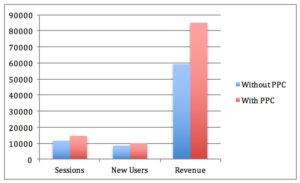
Effects-of-Paused-PPC-Ads

One theory we wanted to analyze is: WILL MY ORGANIC REVENUE AND TRAFFIC INCREASE WITHOUT PAID SEARCH? The simple answer is yes.

Organic traffic experienced a 43% increase and organic revenue increased 20% compared to the previous period when paid ads were running. The increase, however, was not enough to make up the difference of the lost revenue from paid search alone. So while it definitely helped to bridge the gap, overall there was a sharp decline in our website KPIs across the board.

Since all other channels remained flat in sessions and revenue, it painted a clear picture that the decline in performance was a direct result of the lack of paid search traffic.

So if you were ever wondering if it was worth paying to play on the search engine results page (SERPS) and theorized that paid search ads were essentially just pulling away from your organic traffic and revenue, this case study should give you some conclusive evidence. While paid search campaigns do cannibalize some traffic and revenue that would have come through organically, overall it exponentially drives sessions and revenue that goes above and beyond what would have come through organically.

Although we can’t say with certainty, another theory related to the impact of turning these paid search campaigns off is that the their competitors traffic went up and their cost-per clicks went down as one less advertiser was competing for those keywords, which probably helped them to pocket more revenue then normal.

So, if you’ve ever contemplated just turning off your paid search campaigns and letting organic pick up the slack, you should probably rethink your decision. Paid search is a key component in your hotel’s digital marketing strategy and proves it’s worth time and again as one of the most powerful ways to drive qualified sessions and revenue. It is definitely worth the extra budget to compete.
Why Your Hotel Needs Remarketing Lists for Search Ads

SHARE:

The continued climb in cost per acquisition means your hotel’s digital marketing budget needs to be working harder and more efficiently than ever before. Your digital marketing agency should be obsessed with finding the most cost effective methods to optimize their efforts (and your budget) across all media channels. One of the more exciting and fruitful targeting options to be released by Google this decade comes in the form of retargeting for search campaigns. Officially called remarketing lists for search ads (RLSA for short), creating a remarketing audience list for your hotel’s paid search campaigns is now essential for optimization because it allows you to reengage with previous visitors to your website, which has proven to improve conversion rates and overall return on ad spend for your budget.

First, let’s start with the basics:

How to Set up Custom Audiences for Your Remarketing Lists for Search Ads

We recommend building audience lists in Google Analytics instead of Google Adwords since it gives you a far greater selection of criteria to choose from when building your audience segments. Once you are logged in, just follow the steps below:

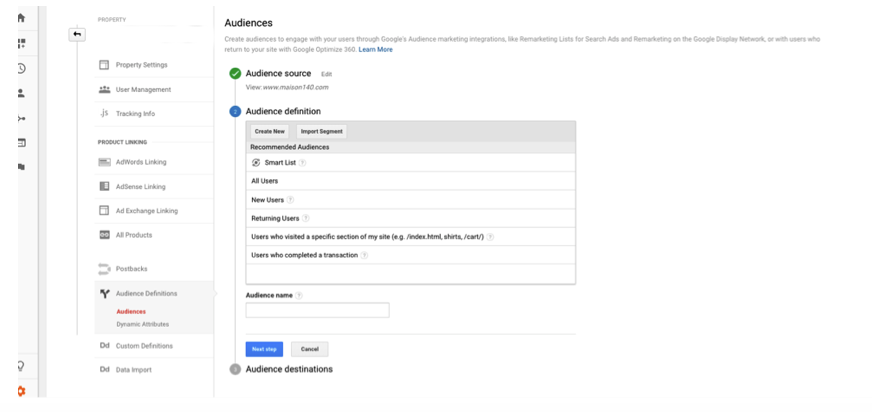
  • Go to the Admin tab and navigate to the property for whom you want to create the audience
  • Click Audience Definitions > Audiences > + New Audience
  • Define Your Audience
    • You can choose from a number of different audience definitions:
      • Smart List
      • All Users
      • New Users
      • Returning Users
      • Users Who have visited a specific section of my site/app
      • Users who completed a transaction
SEM remarketing list

You can create unique audience lists based on user behavior on your site and then use those lists for future remarketing campaigns. Before you get started, there are a few things you should know about remarketing audience lists:

    • Audience List Definition: a collection of people who have visited your site
    • Audience lists are used for remarketing
    • The membership of an audience list has a life span of up to 540 days
    • The List needs to have at least 1000 people to target in paid search campaigns

What Audience Segments Can You Create?

The type of audience list you should set up will depend on your client’s objectives.  The most common audience list is “all users” and if you’re new to retargeting or if you have low website visitors, this is where you should start. This is comprised of any visitor to your website.  The real magic and excitement in RLSA audiences comes when you can refine your audience down to more specific lists. Ideas include:

    • All website visitors that have converted in the past X number of days (exclude them from your campaigns – if they just booked a hotel room, you probably don’t want to spend money continuing to market to them)
    • Website visitors to a specific page on your site (such as a list of only visitors who have navigated to a page about weddings)
    • Visitors who have come to the site a specific number of sessions (pick the session number it usually takes to achieve a booking)
    • Website visitors that match a specific demographic – such as gender or age specific
    • Visitors that are on a specific device – mobile, desktop, tablet
    • Visitors that enter the site from a specific source – for example only visitors that came from Facebook or your latest email campaign

To really target your most qualified users, you can segment this list down even further into specific users over a period of time that has not converted.  Typically the more recently a user has visited your site, the more likely they are to convert.

    • All Users Past 7 Days
    • All Users Past 15 Days
    • Cart Visitors
    • Visitors of a certain page on your website

These lists will also allow you to set bid adjustments or remarket with a specific offer or ad set. For example, if a potential hotel guest made it all the way through the booking process but abandoned their shopping cart just before checking out, you could use your remarketing audience list to serve them a new add with an enticing offer in order to encourage them to book their reservation.

What’s the Best Way To Structure Your Campaigns & Assign Audiences?

How you choose to structure your campaign and assign your audience lists really comes down to your personal preference and how you want to manage your targeting settings.  Below are a couple examples of how to do this.

    • If you have a smaller budget to work with and can’t come up with extra funds for a dedicated campaign just for remarketing, you can attach audiences to campaigns as bid only. This will show your ads to members of your remarketing list in addition to the users who match whatever other targeting you currently have set up on the campaign
    • If budget isn’t a hindering factor and you get a good amount of traffic to your website, then you can create remarketing campaigns for all of your custom remarketing audiences you built in Google Analytics and set bid adjustments based on priority and performance

In the hotel marketing industry, we have seen great results when utilizing remarketing lists for search ads. After reviewing data from multiple clients, we have found that they helped decrease average CPC ‘s by 16% while increasing average CTR’s by 62% and ROAS and Conversion Rates by over 100%. To learn more about our internal findings of the benefits of audience lists read our blog post about it.

Need help getting started with remarketing lists for search ads? Reach out to GCommerce today.

How Much Should I Spend on Paid Search for my Hotel?

SHARE:

We get this question all the time from prospective clients and new clients and it’s also something we revisit at least once (or more) every year for current clients. The truth is, there’s a lot more to it than picking a number based on the hotel’s location. It’s a complex answer that can only be determined by deep discovery and understanding of the hotel and its goals, the market the property is located within and historical data from the hotel. At GCommerce, every client’s budget recommendations are customized based on the hotel’s specific goals, historical performance and competitive landscape coupled with data from tools provided by Google, Bing and Doubleclick Ad Services.

7 Key Steps to Determining Paid Search Budget Recommendations for your Hotel

  1. Hotel Discovery & Determining Competitive Advantages - this guides our keyword research which helps us determine the estimated cost per click for qualified keywords. We seek answers to questions such as, What adjectives describe the hotel? What are the nearby attractions that drive visitors to the market? What are the top business drivers for the hotel? What are the hotel’s top competitors? What special amenities, services or events does the hotel support? Then we utilize keyword planner tools from Google and Bing to determine keyword CPC and traffic estimates.
  1. Establish business goals - we work closely with the client to determine their top priorities. Do they have a revenue goal they need to achieve? Does the client want to focus on driving more wedding or meeting business? Are they competing with OTAs to capture reservations? What are some of their biggest challenges and how might paid search help them overcome those hurdles?
  1. Complete Competitive Research - paid search pay per click costs are based on a bidding model. Competitive research factors in how many other advertisers are bidding on the same keywords, whether or not other advertisers are bidding on your brand name and also provides an understanding of highly valuable keywords we should be including in our campaigns.
  1. Analyze Historical Performance - the best way to estimate how specific budget recommendations will impact your bottom line or other business goals is to understand historical performance. GCommerce deep dives into website data, looking back multiple years, to gain insight into traffic, production, conversions, seasonality and other performance trends by month.
  2. Market Research - where is the hotel located? does the market experience any seasonality? We gather information from the client directly and utilize Google Trends to follow keyword popularity trends over time. It is important to allocate budgets as it correlates to business goals and seasonality in the market.
  1. Future Predictions - with a solid understanding of the hotel’s market and their previous performance, we can predict with a degree of confidence how much a specific budget might impact a hotel’s paid search marketing efforts. If they previously spent $Y and saw a return of $X, what kind of results would we expect if we increased or decreased their budget? Using this predictive modeling, we can find the optimal budget to ensure each has a healthy budget that reflects a positive Return On Ad Spend within their stated goals.
  2. Finalization of Target Keywords and Presentation to Client - last, we will prioritize these keywords based on relative competition, traffic, and the hotel’s goals. We will work closely with the client to ensure that all keywords are relevant to their business and end goals. Organizing these keywords into the most relevant Adgroups based on what is most likely to convert provides us with the best opportunity for success in starting with a new budget.


At GCommerce, we believe in a customized approach for every client. This is true for all aspects of the overall marketing strategy and is how we approach each client’s budget recommendations. We utilize the vast amount of historical data and experience we have from working with clients in markets all over the country and combine that with a custom analysis to provide the best hotel paid search budget recommendations possible.

If you’re interested in learning what you should spend on paid search for your hotel, please reach out to your Account Executive or Account Manager today. Not a GCommerce client? Not a problem. Contact us and we can help you get started with strategic paid search marketing solutions today!

Increase ROAS & Decrease CPA

SHARE:

How much are you paying for conversions?

In a world of increasing competition, rising CPC’s, and an ongoing battle over shrinking organic impressions; every click in the Paid Search world counts. As CPCs continue to increase YOY across all industries; the battle over rising CPAs is becoming tougher for hotels to win. Are you maximizing your budget to obtain the most clicks and conversions?

HOW ADWORDS AUDIENCES CAN HELP YOU WIN THE BATTLE OVER RISING CPA

We have all heard of remarketing lists for search and audience targeting, but are you effectively utilizing these tools to maximize your campaigns’ CPA and ROAS performance? If your answer is “no” or “I don’t know”, then you’re missing out one of the most effective ways to segment and target your campaigns to get more conversions for your budget.

Reviewing audience data from multiple clients, here are the results:

  • 16% decrease in cost per click
  • 62% increase in average click-through rate (CTR)
  • 103% higher return on remarketing audiences then non-remarking lists search user traffic
  • 161% increase in conversion rate


Still wondering about your bottom line? COST PER ACQUISITION (COST PER RESERVATION SPECIFICALLY) WAS 64% lower for remarketing lists for search audiences versus all search traffic.

Search Engine Marketing for Hotels

SHARE:

AUDIENCE TARGETING AND ITS INTRODUCTION TO SEARCH ENGINE MARKETING: As advertisers, we have the option to add specific audience targeting to paid search marketing campaigns. Google’s audience targeting was originally only available on display networks and YouTube campaigns, but in May 2017, Google expanded audience targeting to its paid search ad network. For advertisers in the hospitality industry, the in-market audience targeting options include demographics, such as age and gender.

AUDIENCE TARGETING FOR HOSPITALITY PPC: Age plays a vital part in marketing for the hotel and hospitality industry. The legal age to book a hotel room in the U.S. is 18 years old, but many hotels have the option to limit the booking age to guests who are 21 years and older. When evaluating previous traffic and booking behavior, we noticed a higher ratio of spending to revenue in people under the age of 25. Based on this information, we decided to focus our audience targeting for men and women above the age of 24. Currently, there are two different options for including audience targeting for hotels:

  • Focusing on specific demographics
  • Remarketing to the hotel’s returning guests

We focus on a few different types of remarketing. One type of remarketing is website targeting, which delivers ads to people who previously visited your website. Another form of remarketing through Google AdWords is audience retargeting to the hotel’s email distribution list. This is called Google AdWords Customer Match and includes any customer who stayed at the hotel or signed up for a newsletter. Targeting an audience that focuses on specific demographics requires an extensive knowledge of the property and the demographic groups that have the highest conversion rates. Google Analytics will track the conversions and separate each demographic group, based on age, gender, income, or location. Based on the information that we gathered for this hotel, we determined it would be most effective to target age demographics for our audiences.

THE LENOX HOTEL RESULTS: Our team at GCommerce Solutions ran a test for using audience demographic targeting within PPC campaigns for The Lenox Hotel in the Back Bay area of Boston. We completed the following bid adjustments:

  • Added negative bid adjustments of 90% to their audiences that had the lowest conversion rates (18-24 year-olds not searching for Name Terms)
  • Added positive bid adjustments of 25% to their audiences that had the highest conversion rates (45-54 and 55-65).

Our study includes data from June 11, 2017- July 20, 2017, compared to July 21, 2017-August 29, 2017. With changes in demographic targeting, we were able to better control our budget with a 5% decrease in cost per click and 7% decrease in total cost, while capturing a 4% increase in revenue for the property. The results of this test conclude that utilizing age/ demographic bid adjustments is a more accurate way to target the most qualified audience for this hotel, and allows us to increase our overall Return On Ad Spend. GCommerce recommends tracking data at the audience level to understand performance before implementing any bid adjustments. Specific adjustments and test parameters should be unique for your hotel, based on historical data. Please contact us if you have any questions about audience targeting and how you can better utilize this feature to improve performance.

Ready to increase your direct revenue and returns-on-ad-spend? Great! Click the button below and get started today.

AdWords Promotion Extensions Result in Substantial ROAS

SHARE:

HOW TO DRIVE INCREDIBLE ROAS FOR YOUR HOTEL WITH ADWORDS PROMOTION EXTENSIONS

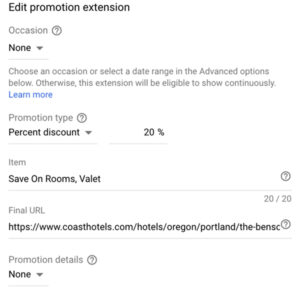
The Benson Hotel, located in Portland, Oregon, was looking for a quick way to increase hotel bookings before the end of the month. Over the course of three days near the end of August 2017, this property wanted to showcase their 20% off rooms and discounted valet parking special on paid search.

Due to the way that Google AdWords serves advertisements, we knew it would be tough to get solid visibility across all of our ad groups and campaigns within the account for this very short sale. That is why we decided that the new promotion extensions within AdWords would probably be our best chance to bring in additional revenue. Adwords Promotion extensions work by enabling the advertiser to showcase a specific deal/sale at the bottom of correlating ads you know have performed well in the past.

Previously, promotion extensions have been available to use only during specific holidays. Now there is a drop down feature allowing you to select an OCCASION, ranging from Christmas to Boxing Day if you deem fit. You have four options in showcasing the PROMOTION TYPE, the first is a monetary discount and the second is a percentile discount. Both of these options can also be further limited by displaying “Up to monetary discount” and “Up to percent discount”. Below that is a 20 character text box allowing you to describe your ITEM. FINAL URL lands your customer onto your desired page. There is a feature called PROMOTION DETAILS allowing you the option of displaying “On orders over” and a “Promo code”. Insert your “Start date” and “End date” (not shown in the example below). Lastly, there are two remaining features titled URL OPTIONS and ADVANCED OPTIONS allowing you to customize this extension further.


2017.09_Blog_Image_1_AdwordsPromotionExtensions


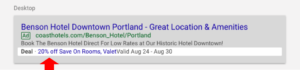
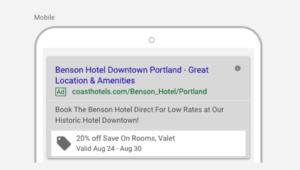
One restriction while choosing the percentile discount is that this “ __% off” is fixated at the front of the passage while then allowing you 20 characters to write about the item you are promoting. The red arrow in the examples below highlights the “__% off” AdWords automatically displays first on the live ad. As Google continues to roll towards a mobile-first index, the aesthetic differences between the ads themselves have become more distinguishable. Adwords Promotion extensions on mobile devices have a large price tag icon that could potentially capture the attention of consumers who may have become accustomed to seeing standard AdWord ads. The Adwords promotion extension total real-estate is also larger on a mobile platform in comparison to desktop.

Blog_2
Blog_3

Between August 25th and August 27th 2017 our Adwords promotion extension for The Benson received 42 clicks with an approximate impression figure of 521. The click-through rate was 8% with an average cost per click of $1.06. With three conversions resulting in a total conversion value of $743 and our total cost being $44.55, The Benson’s return on advertising spend is 16.67 to 1.

Blog_4


Promotion extensions are a relatively new feature for Google AdWords beta. Why not take advantage of some of the exclusive features of this “New AdWords Experience”? Promotion extensions allow advertisers to serve exclusive offers to their customers and to easily call out that promotion within ads through your account, campaign or ad group. Our experience with promotion extensions in this instance showed an increase in the overall CTR, conversions, and revenue on the account. While also showing a decrease in the amount of time spent creating new sale specific ads. Promotion extensions are easy to set up and aim to give your offer more visibility to your audience. Transitioning into the new AdWords user interface clearly has its positives and negatives, but I don’t know anyone who would not like a 16:1 return.

Keep Reading